
Description
Another convenient place to control your alarm
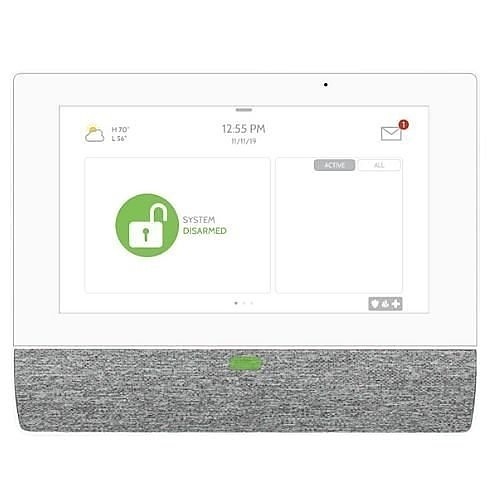
The IQ Remote PowerG adds a 7-inch touchscreen control point to a supported IQ alarm system. It is useful when the main panel is not where you naturally enter, leave or check the alarm—for example, near another entrance or on another floor.
This is a secondary interface, not a second standalone control panel. Your existing compatible main panel remains the center of the system, and the remote must be paired and configured correctly.
Everyday control within easier reach
- 7-inch HD touchscreen interface.
- PowerG communication for supported remote-panel operation.
- Wi-Fi or access-point connection for supported software updates.
- Battery backup.
- Optional control point: the IQ Panel 5 already includes its own touchscreen.
Check your primary panel first
The IQ Panel 5 installation manual documents IQ Remote-PG secondary touchscreens using home Wi-Fi or the panel’s built-in access point. This gives an IQ Panel 5 system an optional additional control point; the connection method and software requirements should be confirmed during setup.
For an existing IQ Panel 4, IQ4 Hub, IQ Pro or another system, send Major Home Security the panel model and software version so we can check the right configuration. The product’s PowerG name alone does not establish every connection mode on every panel.
| Model | IQR-PG |
|---|---|
| Product role | Secondary touchscreen; primary panel required |
| Display | 7-inch HD touchscreen |
| Communication | PowerG; supported Wi-Fi functions |
| Backup power | Battery backup |
| Compatibility | Confirm exact primary panel and software before ordering |
Plan a useful location
Choose a convenient indoor location and follow the power, mounting and pairing instructions. Check communication at the proposed location before final mounting. Walls, layout and installation conditions affect wireless performance; published radio capabilities are not a guarantee for every property.
Smart-home controls visible on a remote do not make those devices or services part of this hardware purchase. Compatible equipment and the appropriate service plan are required for optional automation.
Questions before you buy
Do I need this with an IQ Panel 5?
An additional touchscreen is optional. The IQ Panel 5 has its own touchscreen; choose a remote if another control point would make everyday use easier, after confirming compatibility.
Can this replace the primary alarm panel?
No. It is a secondary tablet for a compatible system. It cannot independently take the place of the primary alarm control panel.
Does this add another monitoring account?
It is an accessory to a compatible system, not a separate monitoring subscription by itself. Confirm how it will be paired during setup.
Are locks, lights and thermostats included?
No. Ask us about optional smart-home integration. Compatible equipment and an upgraded service plan are required, with additional charges.
Product documentation
IQ Remote PowerG installation instructions. Check the current instructions for installation, compatible systems and maintenance.
Reviews
There are no reviews yet.