Installation & help
Installation & Help Center
Practical guides for your equipment, a clear path to activation, and the right place to get help.
Choose your starting point
A new Major system
Follow the order-to-activation path, check your labeled equipment and get ready for the office call.
Adding a device
Check the exact model and compatibility before mounting. Monitoring customers should contact Major to coordinate programming and testing.
Equipment only
Use these free guides and the manufacturer instructions. Arrange programming and any required qualified installation separately.
Find your equipment guide
IQ Panel 5
Power, placement, the supplied stand and wall mount, and checks before activation.
Door & window contacts
Match the location labels, plan sensor/magnet alignment and check each opening.
Motion & glassbreak
Understand how room layout, pets and glazing affect a sensible placement plan.
ADC-V516 indoor camera
Prepare Wi-Fi and power, connect the right camera and confirm your video settings.
From your order to an active system
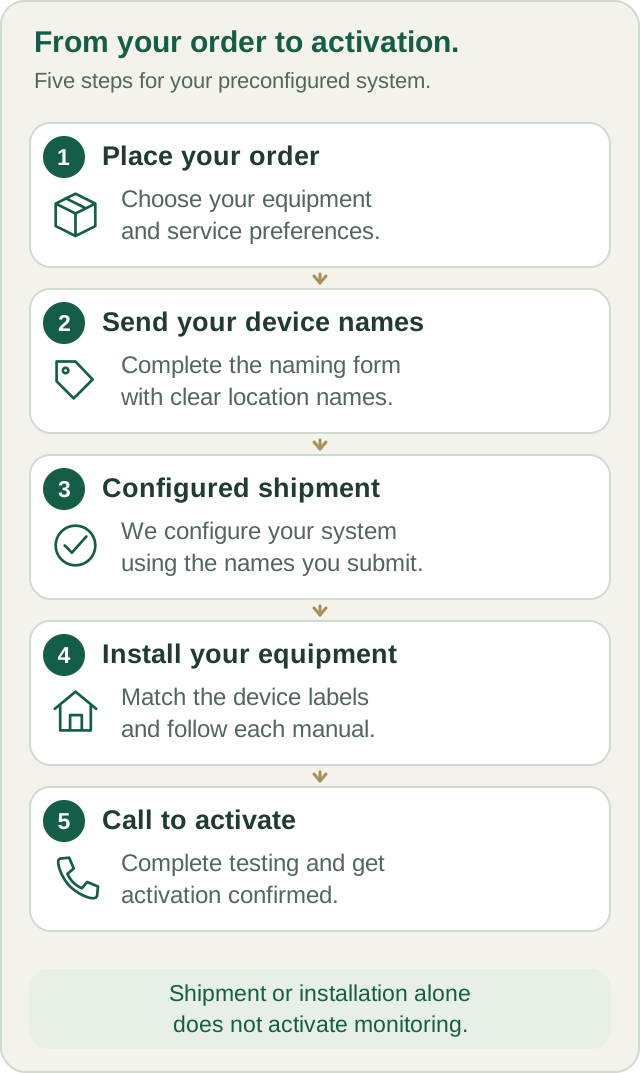
For a new system with Major monitoring, we contact you within 3 business days of purchase. We email the post-purchase setup form so you can name device locations before shipping. Sensors arrive enrolled, named and labeled. After installation, call Major to begin activation; your Alarm.com account is created during that call, with full activation completed within 24 hours of the activation call.
Help from people who know your system
Call (800) 564-8273. Office setup support, billing and administration are available Monday–Friday, 9 a.m.–4 p.m. Eastern. Emergency support and central-station support are available 24/7 for Major monitoring customers. For an immediate threat to life or safety, call 911.
If physical installation is a problem, call us to discuss phone guidance, help arranging a local subcontractor, or a return under the published return policy. Any on-site work and its charges must be agreed separately.
Keep a quickstart beside the box
The printable checklist follows the same setup sequence as these guides. Keep it with your device labels and order details.
Your next step
Written guides are available to everyone. Preprogramming, setup assistance and ongoing technical support are included with Major Home Security monitoring. Equipment-only purchases include free written guides, without personalized programming or technical support.