Installation & help
Activation & Your First Day
Call Major after installation. We create your Alarm.com account, coordinate testing and confirm activation so you know what is ready.
Before you call
- Complete the physical installation in accordance with the device instructions and any qualified-installation requirements.
- Have your order number, labeled device list and any panel trouble messages available.
- Be at the property with access to the panel, devices, your phone and your email.
- Have the home Wi-Fi available for cameras and the panel’s optional IP connection.
- Make sure household members know that coordinated testing is planned.
For routine setup, call during Monday–Friday, 9 a.m.–4 p.m. Eastern. Emergency support and central-station support are available 24/7 for Major monitoring customers; this does not make routine installation, billing or administration a 24-hour service.
During your activation call
-
Confirm the account and device plan
Major reviews the monitored property, device names and the account information needed for setup. Confirm the intended emergency contact order and the purpose of any special devices with the team through the account-setup process.
-
Create your Alarm.com account
Your Alarm.com account is created during the activation call. Major will guide you through the access instructions for your account. Use your own individual access where available and keep login credentials private.
-
Coordinate testing
Major arranges appropriate test mode and guides the checks for the installed equipment and its communication paths. Test each device according to its instructions; a panel display alone does not establish that the monitoring center received the intended signal.
-
Confirm what is active
Full activation is completed within 24 hours of the activation call. Wait for Major’s confirmation before relying on professional monitoring. If you have a camera, confirm video activation and the enabled recording settings as well as alarm monitoring.
Understand the two communication paths
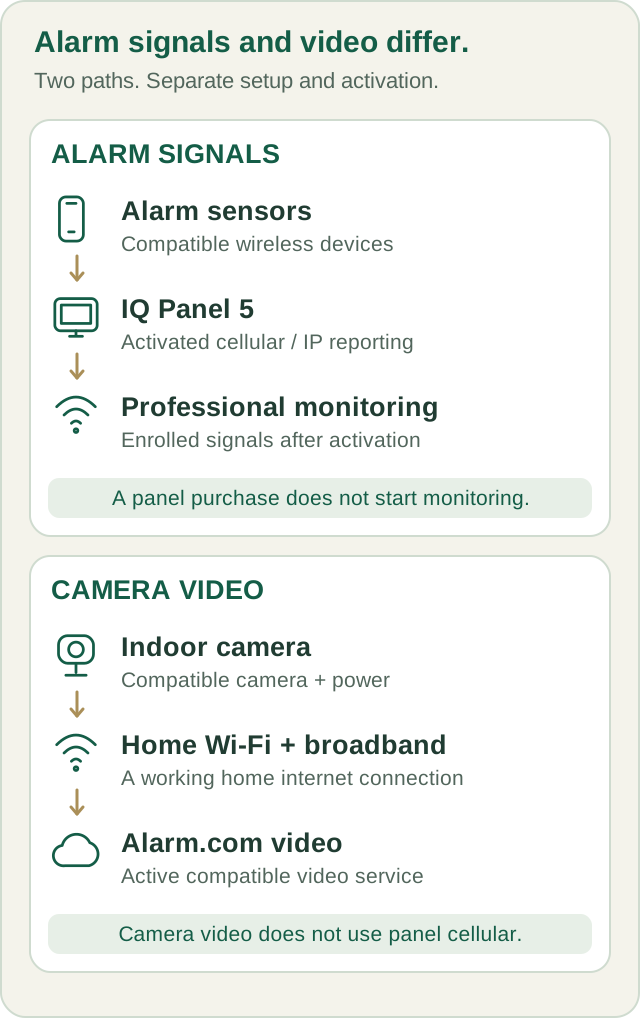
Compatible alarm sensors report through the panel. Activated cellular alarm reporting does not depend on the home broadband connection. Camera video uses your home Wi-Fi and broadband; the alarm panel’s cellular connection is not a backup internet connection for the camera. All paths depend on suitable connectivity, available power and the equipment’s capabilities.
Your first day with the system
- Ask Major to demonstrate the intended Stay and Away arming behavior and any entry/exit delay for your configuration.
- Learn how to disarm and what to do after an accidental alarm; do not assume disarming automatically cancels every response.
- Confirm that each device name clearly describes its real location.
- Review the emergency contact list and how to update it.
- Check your app access and the notifications actually enabled for your account.
- For a camera, confirm live view and an intended recorded event; live view alone does not confirm recording.
- Confirm all testing is complete and normal monitoring has been restored.
- Know the customer-service number and keep your codes private.
Common questions
Can I test an alarm myself tomorrow?
Call Major first, even after activation. Follow the device’s specified test method and the agreed monitoring test procedure. Do not generate a panic, fire or CO test event without coordinating it with Major.
The app works. Am I monitored?
App access and device connectivity are useful checks, but only Major’s activation confirmation establishes that the ordered monitoring services have completed setup and testing.
Does the camera record continuously?
The standard plan provides motion/event-triggered clips, not continuous 24/7 recording. Ask Major to confirm a supported higher plan and any additional storage hardware before buying a memory card or recorder.
What if I see a trouble or offline message?
Record the exact message and affected device name. Check only the ordinary user-level power or network checks in the relevant guide. Contact Major before deleting a device, resetting the system or changing installer settings.
What if the activation confirmation has not arrived?
Call (800) 564-8273 if you have not received confirmation within 24 hours of your activation call. Do not treat a powered panel, app login or camera status light as a substitute.
Your next step
Written guides are available to everyone. Preprogramming, setup assistance and ongoing technical support are included with Major Home Security monitoring. Equipment-only purchases include free written guides, without personalized programming or technical support.