
Installation & help
Plan Motion & Glassbreak Protection
These devices do different jobs. Use the room, its occupants and the actual glazing to plan suitable coverage.

Pets are part of the family
Security that fits life with pets.
Our PGP9914 motion detectors arrive with the pet mask already fitted. Tell us about your pets and where they roam so we can help you plan suitable protection.
Manufacturer-rated pet immunity up to 85 lb requires the specified placement and configuration. Pets' size and movement, furniture and stairs still matter.
Pre-purchase consultation is available to everyone. Personal setup assistance is included with Major Home Security monitoring.
Choose by the job each detector does
| Device | What it watches | What to consider |
|---|---|---|
| Door/window contact | A selected opening separating from its magnet. | The opening, frame material and sensor alignment. |
| PGP9914 motion detector | Motion within its specified detection pattern. | Room layout, obstructions, heat sources and pets. |
| PGP9922 glassbreak detector | A qualifying acoustic glass-breaking event. | Glass type and size, distance, angle and room acoustics. |
These devices can complement one another. They do not establish whole-home coverage simply by being included in a package.
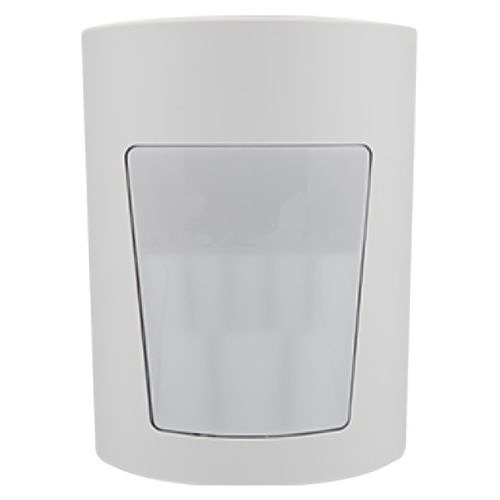
Plan a motion-detector location
Look for a stable indoor position with an unobstructed view of the intended area. Furniture and partitions can block detection. Direct sunlight, heaters and drafts can make a proposed position unsuitable; review the real room rather than relying only on a floor-plan symbol.
- Identify the usual paths through the room.
- Note windows, heaters, air vents and obstructions.
- Describe pets and their access to furniture or stairs.
- Major ships the PGP9914 with its pet mask fitted; ask Major before changing it.
- Have the qualified installer check height, coverage, mounting and tamper requirements.
The manufacturer specifies a general mounting range of 6–8 feet. Homes with pets have additional height and configuration requirements; use the pet guidance below when discussing the plan. The model’s room and installation requirements still apply.
Plan around the pets who live here
Major ships PGP9914 motion detectors with the pet mask already snapped into place. The manufacturer specifies pet immunity for pets weighing up to 85 lb (38 kg) when the mask is fitted and its installation requirements are met. A pet’s weight is one part of the placement decision; it is not a promise that every animal or room will avoid unwanted alarms.
Before choosing the final location, tell Major:
- How many pets live in the home, their types and approximate weights.
- Which rooms they can enter while the system is armed.
- Whether they jump or climb onto sofas, shelves or cat trees.
- Whether stairs or raised surfaces are in the proposed detector’s view.
The manufacturer specifies an optimum center height of 7 feet for its pet arrangement; pet immunity is not supported at 8 feet or above. Ask Major to review a plan involving large pets, climbing cats, several pets or unusual room layouts. We can discuss suitable device choices and whether door/window contacts or appropriately placed glassbreak protection would complement the plan. Different devices cover different events and are not interchangeable.
Keep the supplied pet mask fitted unless Major or your qualified installer directs a change. For monitored systems, coordinate the required detector checks with Major before relying on the configuration; call before generating test alarms.
Ask about planning a system with pets →. Pre-purchase consultations are free. Personalized programming and setup assistance are included with Major monitoring.
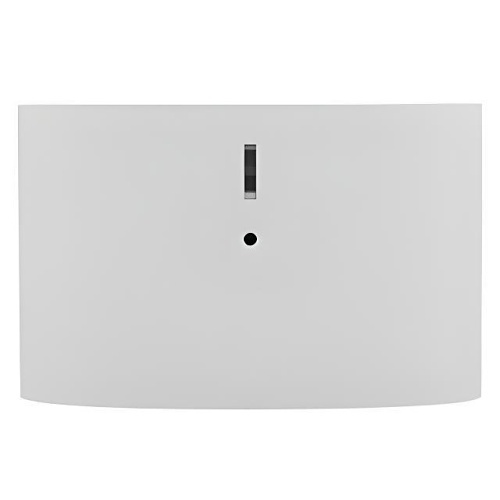
Plan glassbreak protection for the actual room
Start with the panes to be protected, their size and glazing type. They must be in the same room and within the model’s approved acoustic coverage. Curtains, shutters, partitions and other sound-absorbing or noisy features affect suitability.
The current manufacturer guide describes wall placement, with the opposite wall preferred. Ask Major before planning a ceiling position; guidance has changed between manual revisions. Do not assume the longest published range applies to every pane, angle or installation.
- List the relevant windows and approximate room dimensions.
- Identify curtains, shutters and anything between the detector and glass.
- Note loud equipment or other regular noise sources.
- Check a proposed wall position with Major or the qualified installer.
- Arrange the specified acoustic test as well as the radio communication check.
A detector appearing online does not prove it will detect a qualifying glass-breaking event. Use the manufacturer’s prescribed test method and equipment. A phone recording, a clap alone or an improvised impact is not a substitute; never break glass to test the system.
Prepare for the room review
A simple sketch and ordinary room photographs can help Major understand the arrangement. Mark the intended device location and the openings you want to protect, without including alarm codes or account information. Keep each sensor’s label with the agreed location plan.
Call Major before initial and routine tests so test mode, the test sequence and the return to normal monitoring can be coordinated. Do not adjust installer settings or change device types to suppress a problem.
Manufacturer instructions
- PGPx914 motion detector installation guide, revision 02
- PGPx922 glassbreak detector installation guide, current DSC download
Use the edition matching the supplied equipment. Major’s current planning guidance was checked against motion revision 02 and glassbreak revision 04.
Your next step
Written guides are available to everyone. Preprogramming, setup assistance and ongoing technical support are included with Major Home Security monitoring. Equipment-only purchases include free written guides, without personalized programming or technical support.