
Description
Start with a panel you’ll use every day
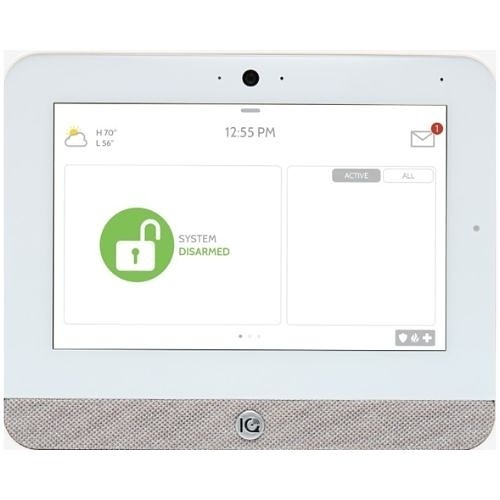
The IQ Panel 5 brings security controls, device status and everyday system interaction to a 7-inch touchscreen. This IQP5017 version has built-in PowerG+ security communication and a Verizon cellular communicator for the United States. It is the starting point for a new Major Home Security system, with compatible sensors purchased separately.
Choose the devices for your entry points and rooms instead of paying for a package that misses what matters to you. The touchscreen gives you a local control point, while an activated Alarm.com service plan enables its supported remote features.
A strong foundation for your system
- 7-inch, 1280 × 800 capacitive touchscreen.
- Built-in 915 MHz PowerG+ two-way security radio.
- Dual-band Wi-Fi and the specified Verizon cellular variant.
- Plug-in power with a rechargeable 3,000 mAh backup battery.
- SmartMount wall mounting; an optional table stand is sold separately.
- Expandable platform, with supported functions determined by equipment, firmware and service plan.
Choose this exact model for the right reason
IQP5017 is the US Verizon model. Confirm coverage and account suitability for the installation address before activation. Cellular communication is part of the alarm’s service configuration; check the monitoring plan alongside the equipment.
PowerG+ is built in. Legacy 319, 345 and 433 MHz sensor support uses the appropriate optional radio card rather than being included automatically with every panel. If you are reusing an existing alarm’s sensors, send us their exact model numbers before ordering.
| Model | IQP5017 |
|---|---|
| Cellular variant | Verizon — United States |
| Security radio | PowerG+ 915 MHz |
| Display | 7-inch touchscreen, 1280 × 800 |
| Power | Plug-in adapter with rechargeable backup battery |
| Mounting | SmartMount wall mount; table stand sold separately |
What to plan before installation
Choose an accessible indoor, dry location with suitable power and communication. Follow the supplied mounting and power instructions, then check the sensors at their intended locations before final installation. Give each device a recognizable name so alerts and monitoring records are useful.
The panel alone is not a complete monitored system. Add the sensors you need and complete account setup, testing and activation. Use our step-by-step selection guide to make your device list.
Questions before you buy
Are sensors included?
This listing is for the panel. Door contacts, motion sensors and other devices are selected separately so you can build the combination your home needs.
Does buying the panel start monitoring?
No. Monitoring begins after setup, testing and confirmation. Standard monitoring is available with monthly or annual payment options.
Can I add a second touchscreen?
Yes. Qolsys documents IQ Remote-PG secondary touchscreens for IQ Panel 5 through home Wi-Fi or the panel’s access point. Confirm the remote configuration and software requirements during setup.
Does smart-home hardware support mean automation service is included?
No. Optional smart-lock, lighting and thermostat integration requires compatible equipment and an upgraded service plan. Additional charges apply. Contact Major Home Security to discuss it.
Product documentation
IQ Panel 5 manufacturer data sheet. Check the current instructions for installation, compatible systems and maintenance.
Reviews
There are no reviews yet.